


Host Your CRM
Introduction
Have you ever wondered what happens to your sales team when the CRM is sluggish or unreachable? For many businesses, a slow CRM isn’t just annoying — it’s expensive. In this article we’ll walk you through why hosting CRM systems on dedicated servers remains a smart choice for certain organizations, how it compares to cloud options, and what practical steps you and your team can take to get the best results. Ready? Let’s dive in.
Why CRM placement matters (and who feels the pain)
Most companies lean heavily on CRM software: it tracks leads, stores interactions, and fuels automation. Around 91% of companies now use CRM tools — a striking adoption rate that shows how central these systems have become to daily operations. DemandSage
When CRM performance falters, the consequences ripple: lost sales opportunities, frustrated staff, and unhappy customers. Did you know that for many enterprises the cost of an hour of downtime can exceed hundreds of thousands of dollars? That kind of hit wipes out more than just a morning — it damages reputation and revenue. Queue-it
So why choose dedicated? Let’s compare.
Dedicated servers vs cloud: a quick, practical comparison
Think of hosting like housing. A shared apartment (shared hosting/cloud multi-tenant) is cheaper, easy to move into, and fine for many people. A dedicated house (dedicated server) gives you the entire property: complete control of the wiring, locks, and layout. You pay more, but you get privacy, stability, and the freedom to renovate.
Table: Quick comparison
| Feature | Dedicated Server | Cloud / Multi-tenant |
| Resource isolation | Yes — full | No — shared (variable) |
| Custom configuration | Full root control | Limited or templated |
| Predictable performance | High | Can vary under noisy neighbors |
| Security posture | Strong (single-tenant) | Strong if configured; more shared-exposure |
| Scalability | Vertical + manual scaling | Horizontal + automatic scaling |
| Cost model | Fixed / CAPEX-like | Opex, pay-as-you-go |
These trade-offs matter depending on your CRM’s scale, compliance needs, and the skills your team has. If you run a compliance-heavy CRM, for example in finance or healthcare, a dedicated server can simplify audits. If you’re a nimble startup who needs to scale up and down rapidly, cloud might be easier.
Real-life scenarios: when dedicated servers shine
We’ll give you three everyday examples so you can picture this:
- Local retail chain with 50 stores. You depend on fast POS integration and near-zero latency between point-of-sale and customer profiles. A dedicated server in a nearby data center gives you consistent response times; your staff stops muttering about “lag” at checkout.
- Mid-sized B2B SaaS company. We deploy integrations with internal databases and in-house analytics. You need fine-grained control over network routes and backups; shared cloud VMs impose limits on deep customization.
- Accounting firm handling PII. Compliance is non-negotiable. You choose a dedicated server to manage encryption keys, restrict admin access, and provide auditors with clear boundaries.
Each example shows that “one size fits all” doesn’t apply. You, your team, and the context matter.
Security and compliance: not just buzzwords
Dedicated servers offer physical and logical isolation — no noisy neighbor that can leak data or cause unexpected resource consumption. For regulated industries, this isolation reduces scope for some compliance frameworks and makes auditors happier. Many organizations cite stronger ability to implement bespoke firewall rules, hardware-based encryption, and on-prem-style logging as decisive benefits. TechRadar
But don’t get complacent. Security is still a responsibility: patching, monitoring, and access controls remain essential whether you host on dedicated metal or virtual machines.
Performance: predictable beats bursty
Performance predictability is one of the most pragmatic reasons to choose dedicated hosting for a CRM. When you and your salespeople rely on sub-second query times, noisy neighbors in a shared environment can ruin the experience. Dedicated servers eliminate resource contention and let you right-size CPU, RAM, and storage for consistently low-latency lookups. Industry reviews emphasize that bare-metal/dedicated environments are ideal when workloads are heavy or predictable. TechRadar
Costs and ROI: how to think about dollars and sense
At first glance, dedicated servers cost more. But what’s the real calculation? Consider that downtime can be ruinous: surveys find that companies often face downtime costs in the hundreds of thousands of dollars per hour, depending on size and sector. Investing in more stable hosting may pay back quickly if it prevents or shortens interruptions. Queue-itIT Pro
A quick checklist for cost thinking:
- Estimate potential revenue lost per hour of downtime.
- Add remediation & customer-service costs.
- Compare that to the incremental annual cost of a managed dedicated solution (including support).
If the math favors reliability, you’ve got a good business case.
Integration, backups, and disaster recovery: practical notes
CRMs rarely live alone. They sync with email, marketing platforms, telephony, and analytics. Dedicated servers let you create private network routes, VPNs, and specialized replication flows that can be faster and more secure than multi-tenant options.
We recommend:
- Regular off-site backups and automated restore drills.
- A warm-standby plan if uptime is critical: replicate your CRM to a second region or provider.
- Monitoring that alerts you before users complain — use synthetic transactions to test real user workflows.
Small but crucial: administrative responsibilities
Choosing dedicated hosting means you or your provider will manage updates, security hardening, and monitoring. If you lack that expertise, pick a managed dedicated offering. Managed providers give you the benefits of physical isolation without the nightly patching nightmares.
Checklist: Is dedicated CRM hosting right for you?
Ask yourself:
- Do you require predictable, consistent performance?
- Is data isolation or compliance a major requirement?
- Can your business absorb the operational overhead — or will you pay for managed services?
- Do you have integrations that require custom networking or hardware features?
If you answered “yes” to two or more, dedicated hosting deserves serious consideration.
Short how-to: migrating a CRM to dedicated servers (practical steps)
- Audit your current CRM usage. Capture peak loads, typical queries per second, and integration endpoints.
- Design the environment. Choose CPU, RAM, disk type (NVMe vs SATA), and network bandwidth.
- Plan data migration. Use staged replication, test restores, and ensure retention policies.
- Harden the server. Firewall, SSH hardening, application secrets management.
- Cutover during low-traffic window. Monitor closely and have a rollback plan.
- Run post-migration audits and performance tuning.
Facts & proof points (because words alone won’t convince your CFO)
“CRM investments can return around $8.71 for every $1 spent.” That’s not marketing hyperbole — CRM ROI has repeatedly been shown to be strong. DemandSage
Fact 2: Downtime is expensive — many enterprises report hourly costs in the six figures. Investing in reliability is not wishful thinking; it’s risk management. Queue-it
Fact 3: CRM adoption keeps climbing, and market size forecasts continue to grow into the tens of billions — which means more integrations, more data, and more reasons to think about hosting strategy. DemandSageSWK Technologies
The emotional bit (yes, feelings matter)
Isn’t it ironic that companies will pay premium salaries for salespeople yet try to make them work with a laggy CRM? We’ve all grimaced at the spinning wheel while a deal waits. If you feel irritation — perhaps even disbelief — about poor tools holding back performance, you’re not alone. We care about this because slow tools demoralize teams and cost you momentum. Let that frustration fuel a better architecture, not a bitter resignation.
Common objections and short answers
“Cloud autoscaling solves everything.” Autoscaling helps bursty workloads. But CRM workloads often need consistent low-latency database access and specialized network setups that autoscaling alone doesn’t guarantee.
“Dedicated is too expensive.” Compare the total cost of ownership, not just the sticker price. For mission-critical CRM workloads, stability can be more economical in the long run.
“We don’t have a sysadmin.” Then choose managed dedicated hosting. Pay a bit more and sleep better.
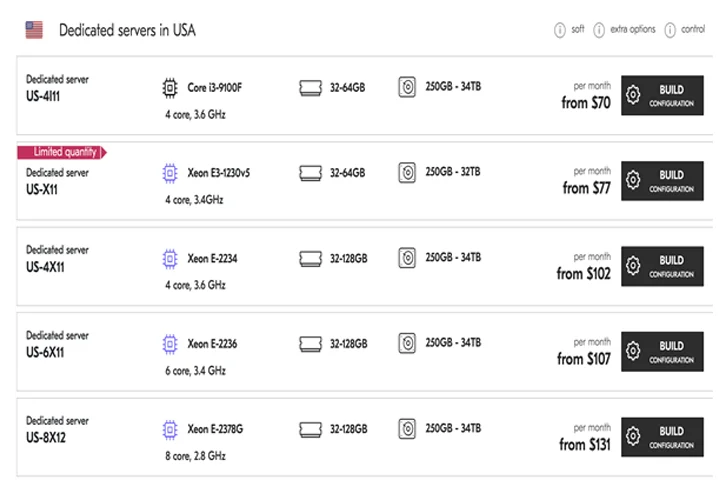
Dedicated servers – Deltahost.com
 Quick checklist for procurement (copy-paste ready)
- Required CPU cores and RAM.
- Disk type: NVMe for IOPS-heavy CRMs.
- Network: SLA for latency and bandwidth.
- Backup frequency & retention policy.
- Managed services: patching, monitoring, 24/7 support.
- Compliance support (audit logs, key management).
Conclusion — final take and call to action
Hosting CRM systems on dedicated servers is not a nostalgia trip. It’s a strategic choice when you need predictable performance, strong isolation, and the ability to customize deeply. Weigh the operational responsibilities against the business impact of downtime and poor performance. If you care about your customers and the productivity of your teams, the hosting layer deserves the same careful planning you give to CRM workflows and sales playbooks.
If you want, we can help outline a migration plan tailored to your CRM: a sensible audit, an infrastructure spec, and a step-by-step cutover strategy. Tell us about your current setup, and we’ll sketch the next practical steps — because making your CRM fast and reliable is not a luxury, it’s a competitive advantage.
